
Overview
A customer service chatbot is an assistant on your website. It answers shopper questions best when it reads your own product data and pages, and when it can hand over to a person. We recommend seeing how a small online store uses one day to day, what happens when it does not know an answer, how it learns from store content, and how you find out why it got something wrong.
Every online store faces the same questions repeatedly. Where is this product from? How do I brew it? When will my order arrive? Answering these by email or phone uses staff time you could spend elsewhere. A customer service chatbot handles that repetitive work. Shoppers get quick answers, and your team can focus on harder problems.
How can a customer service chatbot transform an online store?
A customer service chatbot can speed up answers and ease the load on your team. The effect is easiest to see in a concrete case.
Imagine a small café that sells speciality coffee beans online. Its website gets many questions about bean origins, brewing methods and delivery. Before a chatbot, these arrived by email or phone, customers waited, and staff spent hours on the same answers.
The initial challenge for an online business
The café’s problem was not a lack of interest from customers. It was the delay. A shopper with a simple question often gave up and left without buying. Each unanswered message also meant someone on staff had to stop other work to reply.
Introducing an AI customer service chatbot
The café connected its WooCommerce catalogue and website pages to a chatbot. Shoppers could now ask their questions in the chat window and get an answer straight away. The assistant reads the café’s catalogue and pages and answers from content that meets its match threshold.
Real-time customer interaction and sales support
The chatbot can read live WooCommerce prices and stock, so it can reflect a bean that has just sold out. Shoppers get a clear answer to their question without waiting for a reply from staff.
Impact on staff and customer satisfaction
Staff can spend more of their time on complex orders and wholesale enquiries. Shoppers get quicker answers to simple questions, which can reduce the number of people who give up before buying. The gain comes from the bot handling simple questions well, not from it replacing people.
What happens when the chatbot cannot answer a question?
A well-built customer service chatbot says so when it does not know an answer. It can then offer a handover to a human agent, and it saves the question for review. A bot that always sounds sure is a risk, because a shopper sold the wrong thing ends up returning it.
Take the café’s case. A customer asks about a rare bean that is out of stock and not on the website. The bot says it does not have that information. It then offers a button to speak with a person.
Recognizing the limits of automated support
The useful behaviour is declining well. When nothing in the catalogue or pages is a good enough match, the assistant says it does not have the answer rather than inventing one. Declining is a feature, not a fault.
Seamless handover to a human agent
When the shopper asks for a person, the conversation passes to an operator. The bot stops replying, and the shopper is told they are now talking to the team. If the operator goes quiet for a set period, the chat returns to the assistant, so nobody is left waiting.
Learning from unanswered questions
Each unanswered question is saved with the answer given and the trace. It appears in a review queue. You can add a verified answer, and after that, the chatbot will reply using the verified content.
Operator tools for efficient follow-up
Operators see the full history, so they do not need to ask the shopper to repeat themselves. Reply templates keep common answers consistent across the team. The queue lists handover requests first, then unhelpful replies, then questions the bot could not answer.
How does an ecommerce chatbot learn from your store’s content?
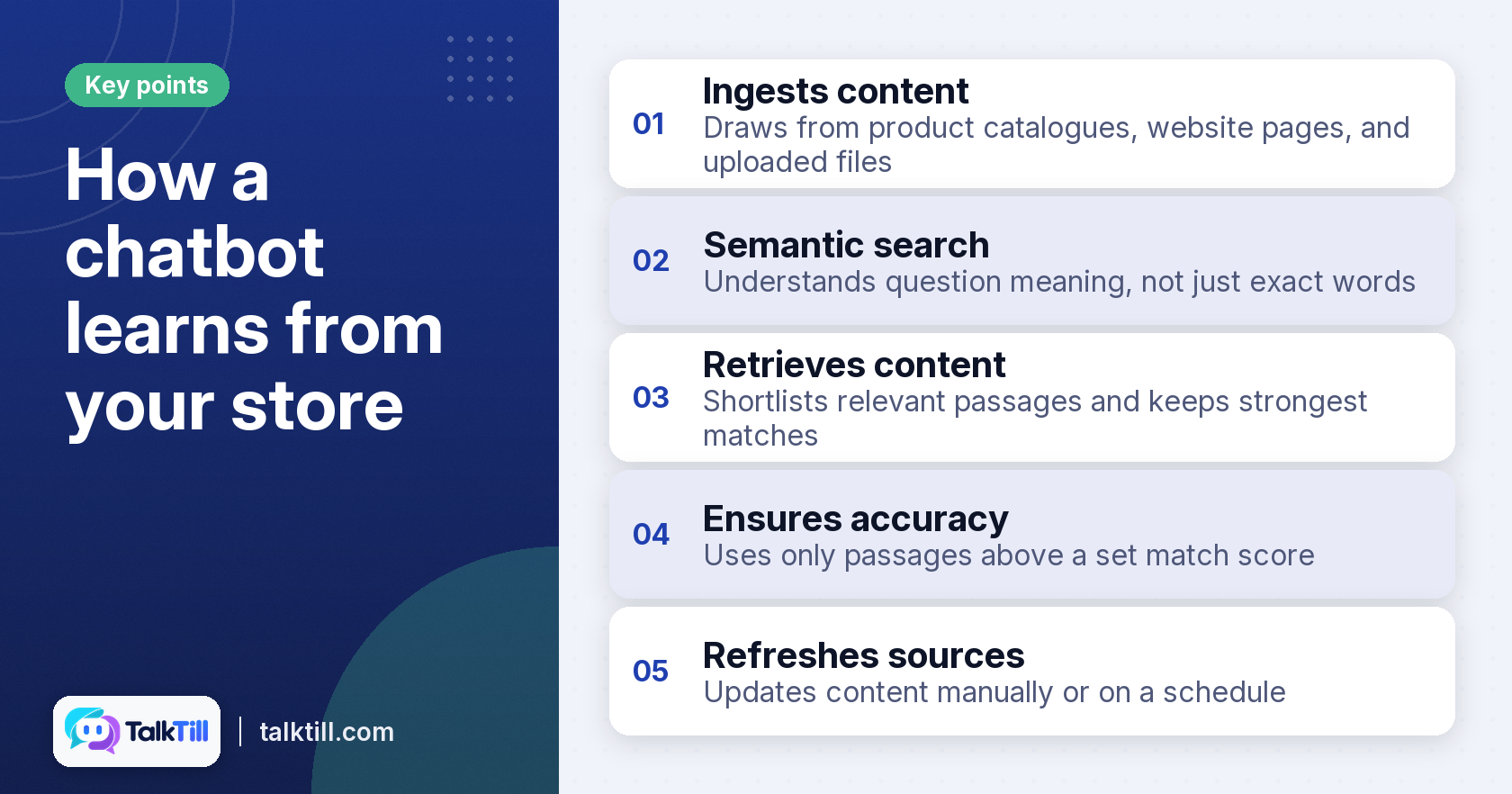
An ecommerce chatbot draws on your own content, including product catalogues, website pages and uploaded files. It answers from that material, and you can refresh the sources by hand or on a schedule to keep them up to date.
The café loaded its WooCommerce catalogue and up to 5,000 pages from its website. These covered FAQs, coffee origin posts and brewing guides. It also uploaded PDFs for its returns policy and the ingredients in its baked goods.
Ingesting diverse store content
Content can come from several places at once. Your pages, files and product catalogue all feed the same assistant. You can refresh the content by hand or on a schedule, so the bot can keep pace with your stock.
Semantic search and content retrieval
The chatbot searches for what a question means, not just its exact words. A shopper who asks about a pan for dosa is pointed to your tawa. It shortlists relevant passages and keeps the strongest matches.
Ensuring accuracy with content thresholds
Each passage gets a match score. Only passages above a set pass mark are used to write the answer. If nothing passes, the bot says it does not know.
Why is understanding chatbot errors crucial for improvement?

Knowing why a chatbot answered wrongly lets you fix the real cause. A trace of its steps shows if the content was missing, found but scored too low, or found and misread. Without it, every error looks like the same vague problem.
Suppose a shopper is quoted an old price for a seasonal mix. Without a trace, the team might call it a hallucination. A trace lets them see what happened so they can act on it.
The limitations of ‘chatbot hallucination’
The label hides the cause. Many wrong answers come from content that was never retrieved, not from the model inventing facts. Treating every error as hallucination leads to guesswork rather than repairs.
Diagnosing retrieval failures
If the right page was never retrieved, the fix is in your content. The page may not have been added, may be blocked from the crawl, or may use words that shoppers do not search with. Update the content and the problem may go away.
Identifying content quality issues
If the page was found but scored just below the pass mark, make the passage more specific. A clearer heading or plainer wording can help it clear the threshold. You can also add a verified answer for that question.
Implementing targeted solutions
If the passage was used but still misread, a verified answer or a rule for it can correct it. Shoppers see a small “Sourced from this store” line under answers built on your content, so they know where the information came from. Each targeted fix can make the chatbot more reliable over time.
Key takeaways
- A customer service chatbot can answer common questions quickly, at any time the site is open to shoppers.
- A well-built bot declines when it does not know, and can hand the shopper to a person.
- Unanswered questions go to a review queue, and verified answers help prevent repeat errors.
- The bot answers from your catalogue, pages and files, which you can refresh by hand or on a schedule.
- A trace shows if an error came from missing content, weak matching, or misreading.
Conclusion
A customer service chatbot helps an online store answer shoppers quickly and frees its team for harder work. It works best when it answers from your own content, declines gracefully, and can hand over to a person. When something goes wrong, a clear trace shows the likely cause. Fixes can then be targeted rather than guessed.
FAQs
Are customer service bots AI?
Many are. Modern customer service bots use AI to understand what a question means and to find the right answer in your content. Simpler bots only follow fixed scripts, so check which kind you are evaluating.
How do I chat with a live agent?
Most chats offer a button to request a person. Choosing it passes the conversation to an operator, who can see the full history. If no one is available, the chat can return to the assistant after a short wait.
How to communicate with a chatbot?
Type your question in plain words, as you would ask a shop assistant. Short, specific questions usually get the best answers. If the bot cannot help, ask for a person.
What are the benefits of an ecommerce chatbot platform?
A platform gives you one place to load your catalogue and pages, answer questions and review gaps. It also lets your team reply to shoppers from the same console. This can help keep answers consistent across the store.
Can a chatbot for an online store handle multiple languages?
Some platforms support multiple languages, but check the list for each one. TalkTill answers in English and nine Indian languages. Test a few questions in each language before you go live.
How does a WooCommerce chatbot integrate with my existing store?
A WooCommerce chatbot connects to your catalogue. It can read live prices and stock, and link shoppers to the right product page. Setup usually involves installing a plugin and choosing which content to include.