Overview
A RAG chatbot answers questions by first finding the right passages in your own content then writing its reply from those passages only. This guide covers the build in four steps: preparing your content, finding passages by meaning, scoring and filtering them and generating a traceable answer. It also addresses the testing and launch decisions that keep the chatbot accurate and show it when to hand over to a person.
A RAG chatbot is only as good as the content it can read and the checks it runs before it speaks. Most of the work sits in those checks rather than in the language model.
What is a RAG chatbot and how does it work?
A RAG chatbot answers from documents it fetches when asked. It does not rely on what a model memorised during training. RAG means retrieval-augmented generation, and the name describes the method. First retrieve, then generate.
The idea is simple. Your pages, files and product listings are split into passages, and each passage is turned into an embedding, a list of numbers that captures its meaning. When a shopper asks something, the question gets the same treatment. The system then compares meanings, not just words, to find the closest matches. Each match gets a score, and only passages above a similarity threshold move on to the answer.
We built our own assistant around this sequence. It reads your content, finds passages by meaning, checks each score and replies only from what passed. That last part matters. The threshold decides if the assistant answers or declines, so it deserves as much attention as the content itself.
Step 1: Prepare your content for the RAG chatbot

Preparation decides how much the chatbot can ever know. Your content can include many pages, files from PDF to Excel, and a WooCommerce catalogue. Gather the sources that answer real questions. Then remove or rewrite the ones that do not.
Next, split that content into passages. This step is called chunking, and it quietly sets the ceiling on answer quality. A passage that is too long mixes several topics, and one that is too short loses its context. Each passage then becomes an embedding.
Content also goes stale. Prices change and stock sells out. You can refresh your content manually or set it to update at intervals. Pick the rhythm that matches how often your facts change. For a store with daily price changes, weekly refreshes will eventually give shoppers wrong prices.
Which content to include first
Start with the pages customers ask about most, such as delivery, returns, sizing and product details. Product questions may also be relevant to your business. Add your catalogue at this stage too. Leave out internal notes and old campaign pages that compete with current information.
Rewriting content so it can be found
Write passages that name the thing they describe. A page that says “our pan” will lose to one that says “non-stick tawa for dosa”. Shoppers search with ordinary words, so your content should use the same words.
Step 2: Implement semantic search for relevant passages
Once your content is ready, the chatbot searches it by meaning. The shopper’s question gets an embedding, and the passages closest to it in meaning are gathered. Many systems also run a keyword search alongside, so exact terms such as a model number are not missed.
Meaning-based search is why a question like “pan for dosa” can find a listing for a tawa, even when the listing never uses the word “pan”. Keyword search alone would miss that match.
In our setup, a shortlist is created and the best passages are kept for scoring. A shortlist that is too narrow can miss the passage that holds the answer. A shortlist that is too wide adds noise, so the shortlist size is a setting worth testing against your own questions.
Step 3: Score and filter retrieved information
Every candidate passage gets a match score. Anything below the pass mark is dropped before the language model sees it. This filter is what stops a blog post about a spring sale from being treated as an answer to a product question.
The pass mark is called the similarity threshold. Testing it is where implementation work pays off. Build a set of real shopper questions, record which passages should answer each one, and check the scores those passages actually receive. A threshold that rejects correct passages is too high, and one that admits off-topic passages is too low. There is no universal number, so measure against your own content rather than copying a figure from someone else’s setup.
If no passage clears the line, the chatbot says it does not know. That is the correct outcome. A decline with a clear next step is far better than a confident guess built on a weak match.
Step 4: Generate the answer and provide transparency
The language model writes its reply using only the passages that cleared the threshold. It is also told to say so when those passages are not enough. Prices and stock come live from WooCommerce, not from a snapshot, so a reply about something that sold out this morning is corrected at the moment of asking.
Links and images are checked against your store as well. An invented link loses its link, and an invented image is replaced or removed.
Keeping a trace of every answer
Every answer should be saved with its trace. The trace records what the system read, which candidates it scored, what it used and what it dropped. When a shopper reports a wrong answer, the trace shows which stage failed, so you can fix the right thing.
A trace separates several cases. A passage that was never retrieved. A passage that was retrieved but scored below the line. And a passage that was used and still misread. Shoppers only see a small “Sourced from this store” line, so the trace is where you diagnose.
Testing and evaluating answers before launch
Before going live, run a fixed set of test questions through the full pipeline. For each one, check the right passage was retrieved and cleared the threshold. Also check that the final answer matched the passage. Keep the questions and expected sources in a spreadsheet so you can rerun the same tests after every content or setting change.
Include deliberately awkward questions in the set. Add misspellings, questions in a second language and ones your content does not cover. The correct behaviour for uncovered questions is a clear decline, so score those as passes only when the chatbot declines.
Review the results with the trace open. A failed test tells you where to look, and the trace tells you which stage to change. Repeat the cycle until the results are stable, then launch with a plan to review unanswered questions each week.
Common mistakes when building a RAG chatbot
Many wrong answers get labelled “hallucination”, but many are retrieval failures. If the chatbot was given the wrong material, or no material at all, the cause lies in retrieval rather than generation. Checking retrieval first will save you weeks of trying to fix the model. Some errors occur after relevant content has been retrieved, so the trace should be checked at every stage.
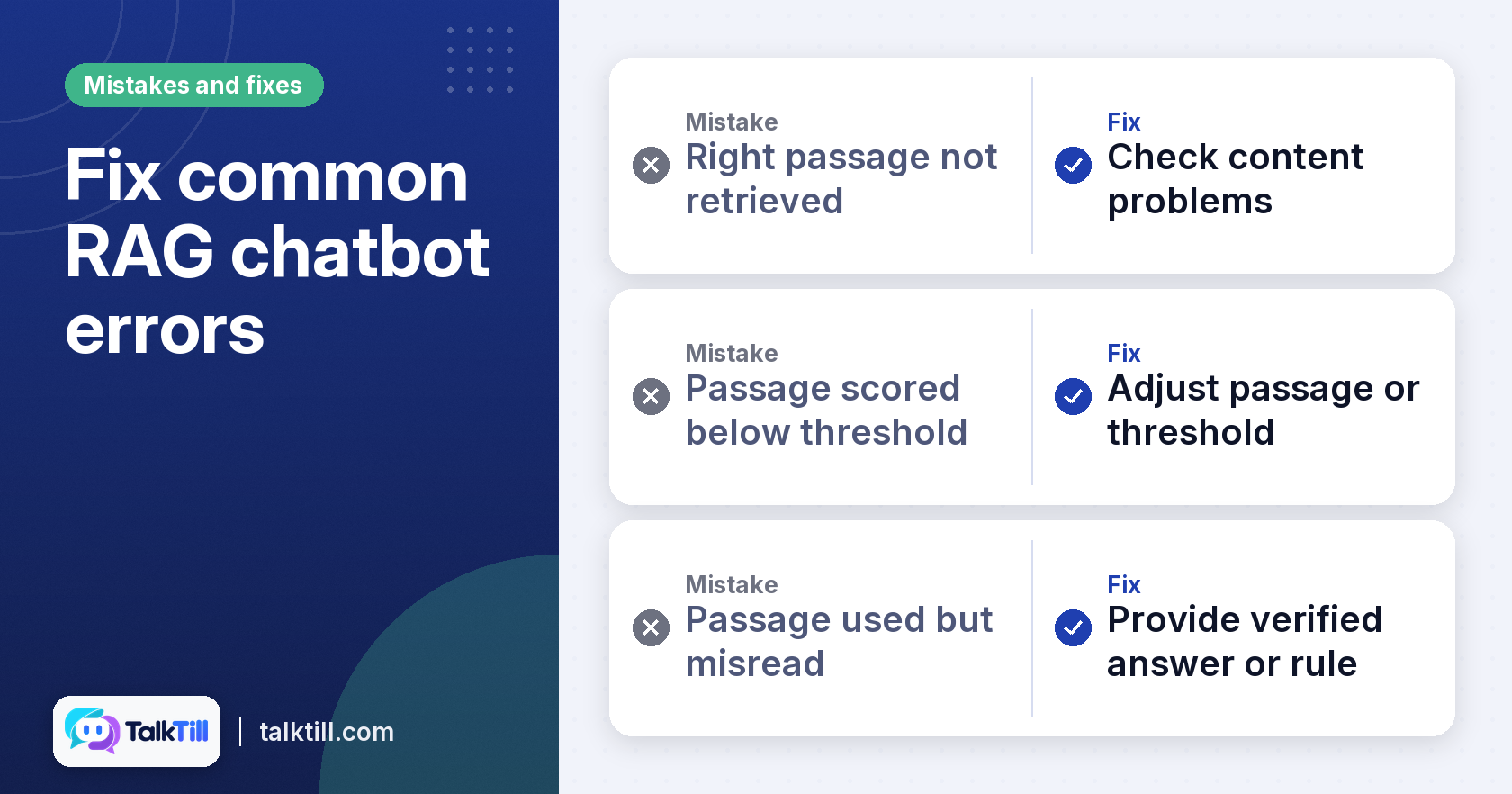
Several failures explain most of what goes wrong. First, the right passage was never retrieved. This usually means a content problem: the page was missing, blocked from the crawl or worded in a way shoppers never search with. Second, the passage was retrieved but scored below the threshold. This points to a passage that is too vague or a threshold set in the wrong place. The third is the rarest. The passage was used and still misread. This is a true model fault. It is usually fixed with a verified answer or a rule.
Without a trace, all three look identical to the shopper and to you. A chatbot that declines well is part of the fix. When it does not know, it should say so, offer a person and save the question as an open gap for your team to review. An assistant that never declines is not confident. It is unsupervised.
Key takeaways
- A RAG chatbot answers from passages retrieved at the moment of the question, not from training memory.
- Content preparation, including chunking and regular refreshes, sets the upper limit on answer quality.
- Semantic search finds passages by meaning, and the similarity threshold decides which ones the assistant may use.
- Test the full pipeline with real and awkward questions before launch, and keep a trace of every answer.
- A chatbot that declines and hands over to a person is working as intended.
Conclusion
A RAG chatbot is a sequence of checks, and each one can fail in its own way. Prepare your content carefully, measure your threshold against real questions and test the whole chain before launch. Keep a trace of every answer. When something goes wrong, the trace will show you which stage to fix. To see how these stages work in practice, visit our RAG chatbot product page.
FAQs
When should a business use RAG?
A business should consider RAG when customers ask questions that depend on its own content, such as product details, policies, prices or documentation that changes over time. It suits situations where answers must be traceable to approved sources and where a wrong guess carries real cost. If your questions are general knowledge that never changes, a simpler setup may be enough.
How to create a RAG app?
Start by gathering the content your users need, splitting it into passages and turning those passages into embeddings. Then add a search step, a scoring threshold and a language model that answers only from the passages that pass. Test the whole chain with real questions before you launch.
What does RAG bot stand for?
RAG stands for retrieval-augmented generation. The name describes the process. The bot retrieves relevant passages first, then generates an answer from them.
Can I build my own AI chatbot?
Yes, if you have the skills to manage content preparation, search, scoring and hosting. Many businesses use a platform that handles those stages and shows the trace for each answer. Either way, the content you give the chatbot will matter more than the model you choose.
How much does an enterprise RAG chatbot cost?
Costs depend on the volume of content, the number of conversations, the level of integration and your choice to build or buy. Ask any vendor to define its billing unit in writing, including what counts as a conversation and how refreshes are charged.
What languages can a RAG chatbot support?
It depends on the platform and on the language of your content. Our assistant supports multiple languages. Check that the language you need is supported for both the conversation and the retrieval step, since content in one language may not match questions asked in another.