Overview
An AI chatbot for business answers customer questions by reading your own content and replying only from what it can verify. This guide explains how these assistants work, what to check before you choose one, and how pricing usually works. It also shows why visibility into each answer matters when something goes wrong.
An AI chatbot for business is a tool that sits on your website or shop and answers questions from shoppers. If you choose one well, you understand how it finds answers, how it reports mistakes, and what it costs over time. The sections below cover each point in turn so you can compare options on the same terms.
How does an AI chatbot for business actually work?
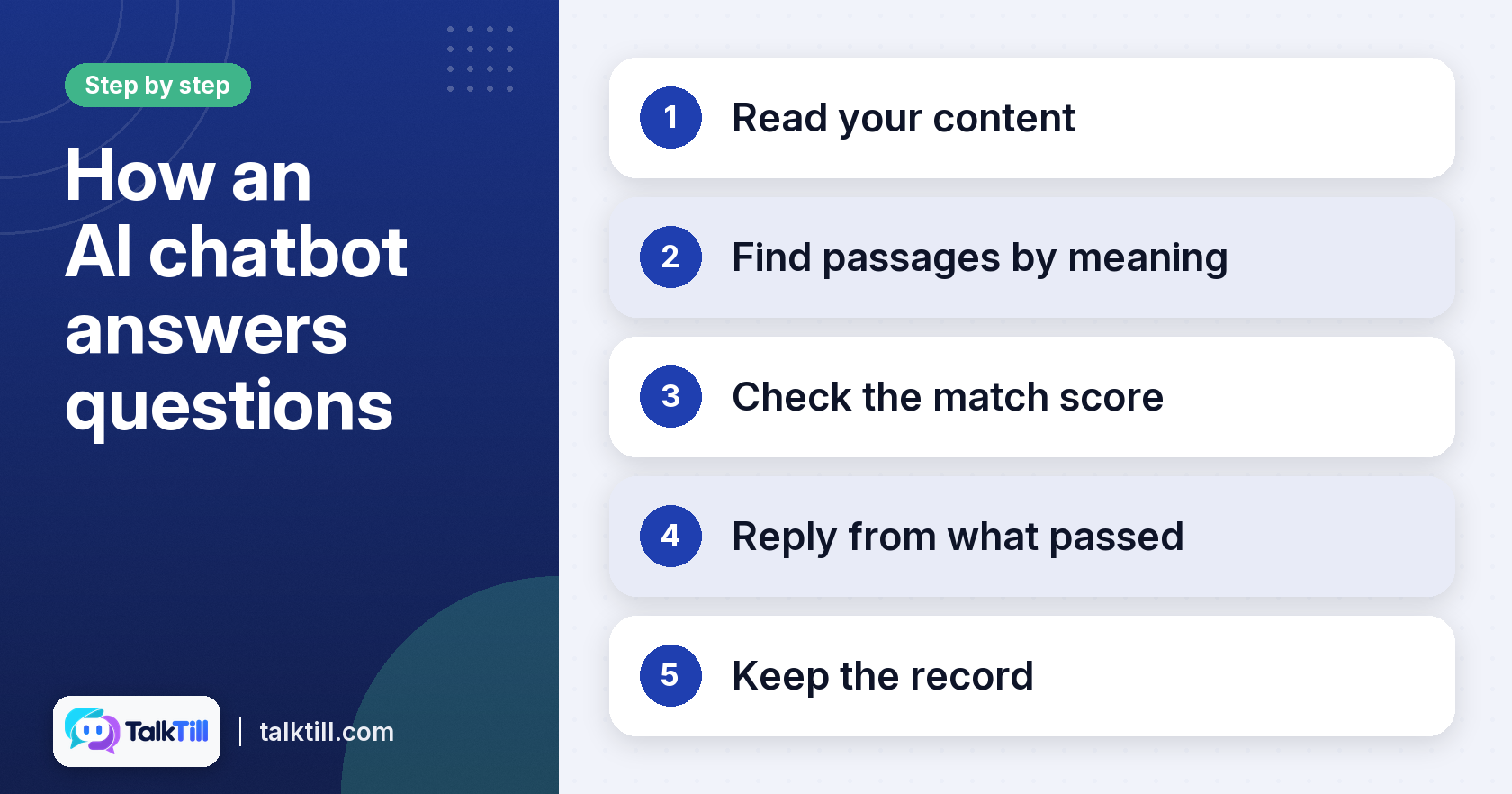
An AI chatbot for business reads your content, finds the passages that match a question, scores them, and then writes an answer from the passages that scored well. It does not answer from general knowledge alone. That single design choice decides how accurate it is and how easy it is to fix.
The retrieval augmented generation process
Retrieval augmented generation, or RAG, is one approach assistants use. In plain terms, the assistant first searches your content then writes a reply based on what it found. These steps usually run in that order.
- Read your content. The assistant takes in your pages, your product catalogue and any files you upload.
- Find passages by meaning. It matches the question to passages by meaning, not only by shared words. A question about “pan for dosa” can find a listing for a tawa.
- Check the match score. Each passage gets a score. Anything below the pass mark is dropped.
- Reply from what passed. The answer uses only the passages that cleared the line. If nothing passes, the assistant should say it does not know.
- Keep the record. The answer is saved with its trace, which shows what was read and what was scored.
TalkTill follows this pattern. It can read long documents, PDF and Excel files and a WooCommerce catalogue. It reads live stock and prices rather than a copy taken last week, which helps keep product answers current as your store changes.
Why transparency in AI chat matters
When a shopper gets a wrong answer, there are two different causes. The right page may never have been found. Or it may have been found and misread. The symptom looks the same in both cases, but the fix is different. A platform that hides the step in the middle leaves you guessing.
We think the trace is the most useful feature an assistant can offer. It shows you which passages were read, how each scored, and which were refused. Without that view, you can only guess the cause. Our about page explains why we built our assistant this way.
Performance and language capabilities
Many Indian shoppers use more than one language, often on phones with patchy connections. TalkTill speaks English and nine Indian languages, and answers in the language and script the shopper chooses. Its widget is small and loads quickly on slow connections. The launcher reserves no space in your page layout.
Related: How a RAG chatbot answers, stage by stage, TalkTill
What should you look for in an AI chatbot for your website?
When you compare options, put transparency first, then how well the assistant uses your existing content, then the experience it gives shoppers. A tool that shows its reasoning is easier to trust and easier to improve.
Diagnostic transparency and error resolution
Ask any vendor to show you the trace behind a wrong answer. A good trace lets you tell three failures apart.
- The right passage was never retrieved. The fix is in your content. The page may be missing, blocked from the crawl, or worded in a way nobody searches with.
- The passage was retrieved but scored too low. The fix is to make that passage more specific, or to add a verified answer for the question.
- The passage was used and still misread. This is rarer. It is fixed with a verified answer or a rule.
Shoppers do not see these scores. They see a short line showing the answer came from your store. For critical information, such as a return policy, you can write verified answers that always take priority over anything the crawl found.
Comprehensive content integration
Check what the assistant can read and how it keeps that content current. On TalkTill, the product knowledge feature syncs your WooCommerce catalogue every day and on demand, with each product’s price, stock, image and link. You can also add your site by address or sitemap, or upload documents such as size charts or returns policies.
Our advice is to review the content before you train on it. Most wrong answers start with a page that is vague, out-of-date, or split across several places. The guide on preparing your content for an AI assistant covers what to crawl, what to upload and what to rewrite.
Customer experience and customisation
The experience shoppers have shapes if they keep using the chat. Useful features include:
- Language options. Shoppers can choose English, Tamil, Hindi, Telugu, Kannada, Malayalam, Marathi, Bengali, Gujarati or Punjabi.
- Persistent conversations. A shopper who opens a new tab finds the conversation still there, until they end it.
- Custom branding. You can pick the design, your colours, your logo, your greeting and where the widget sits on the screen.
- An AI disclosure. The line “You’re chatting with an AI assistant” should always appear in the header, before the first reply. A disclosure like this may be needed by law.
How much does an AI chatbot cost for business?

An AI chatbot’s cost depends on the features you need, how much content it reads and how often it answers. Vendors price these in different ways, so the headline figure rarely tells you the full story. Compare what is included, not only the number at the top.
Understanding pricing models
Pricing usually follows one of a few patterns. Some vendors charge by feature tier. Others charge by the number of pages or products the assistant reads, or by the number of conversations it handles. Some combine these. Before you compare two quotes, check what each includes, how overage is billed, and if content refreshes count against your limit.
Value beyond the price tag
The cheapest plan can cost more if it hides the causes of wrong answers. Time spent guessing why the assistant failed is a real cost. So is a shopper who leaves after a wrong price. Ask if the plan includes the trace, verified answers, live stock and price reading, and support that answers your questions directly.
TalkTill’s transparent pricing approach
TalkTill publishes its prices on its website. You can check what a plan costs before you speak to anyone. We also publish the comparisons we make with other vendors, including where they do better than we do. We think a buyer should be able to check the price and the trade-offs in one place. For current plans, see the TalkTill pricing page.
How can an AI chatbot boost ecommerce sales and support?
An AI chatbot can answer routine questions at any hour, show relevant products and free your team for harder problems. The gain comes from accuracy. An assistant that quotes the live price and stock is more useful than one working from an old copy of your catalogue.
Automated customer support
Many support questions repeat. Delivery times, sizing, returns and stock checks come up often. An assistant that answers routine questions from your policy content can reduce the load on your team. Set up verified answers for the questions where a wrong reply would cost you most, such as refund rules.
Driving sales through instant information
A shopper who gets a clear answer about fit, colour, or availability may be more likely to buy. Talktill can send them to the correct product page, using the link and photo from your store. It reads live stock and price, so your answers stay current as the catalogue changes during the day.
Efficiency for human agents
If a question is too complex for the assistant, it can say it does not know and offer a person. We built TalkTill for Indian shoppers, often in more than one language, and it answers in the language the shopper chose.
Key takeaways
- An AI chatbot for business answers from your own content, scoring each passage before it replies.
- The trace shows if a wrong answer came from missing content, low scores, or a misreading, and each needs a different fix.
- Check what content the assistant reads, how it syncs, and which languages and features shoppers get.
- Compare pricing on what is included, not only the headline figure, and factor in the time a hidden failure costs.
- Use the assistant for routine questions and offer a person when a question is too complex.
Conclusion
An AI chatbot for business is only as useful as the answers it can prove. Look for an assistant that reads your live content, shows the trace behind each answer, and publishes its prices. Choose the option that fits your store and your shoppers, then test it on questions you already know the answers to. If you want to see how TalkTill handles this, you can read the TalkTill pricing page and look at the widget and product knowledge features.
FAQs
Which AI chatbot is best for business?
The best choice depends on your store, your content and your budget. Look for live stock and price reading, a visible trace and clear pricing. Test two or three options on the same ten questions before you decide.
What not to tell ChatGPT?
Do not share passwords, payment details, personal data about your customers, and confidential business information. If the assistant will process customer data, use a business tool with clear data handling terms.
What are the top 5 AI chatbots?
Rankings change quickly and depend on your use case. Rather than trusting a list, judge each option on transparency, content integration, language support and published pricing.
What is the difference between an AI chatbot and a regular chatbot?
A regular chatbot follows fixed rules or scripted paths. An AI chatbot reads your content and writes answers, which lets it handle questions you did not script. The trade-off is that it needs good content and a way to check its answers.
Can an AI chatbot integrate with my existing systems?
Many assistants connect to your website, catalogue and files. On TalkTill, the WooCommerce catalogue syncs daily and on demand, and Shopify is planned next. Check which systems each vendor supports before you commit.
How long does it take to set up an AI chatbot for a website?
Setup time depends on how much content you have and how well it is organised. Smaller stores with clean catalogues may move faster, while larger sites need time to review and rewrite content before the assistant is accurate.