
Overview
An AI chatbot for website use comes in three broad types, basic Q&A bots, content-driven assistants, and conversational commerce assistants. Each suits a different business. We compare them on information retrieval, live data, actions, language support, and transparency, and give a clear recommendation for online stores.
An AI chatbot for website visitors can answer questions, but the type you pick decides how far it goes. Some only repeat FAQ text. Others read live stock, answer in several languages and add items to a cart. Knowing the difference helps you avoid paying for features you will not use or missing the ones that drive sales.
Chat is a common feature on many business websites, and a shopper who gets no answer may move on to a competitor. Adding a bot is easy. Choosing one that helps is harder.
The first step is to understand what the options do. An AI chatbot for website use can be a simple answer machine or a full sales assistant. The gap between them matters more than the brand name.
How do AI chatbots for websites differ?
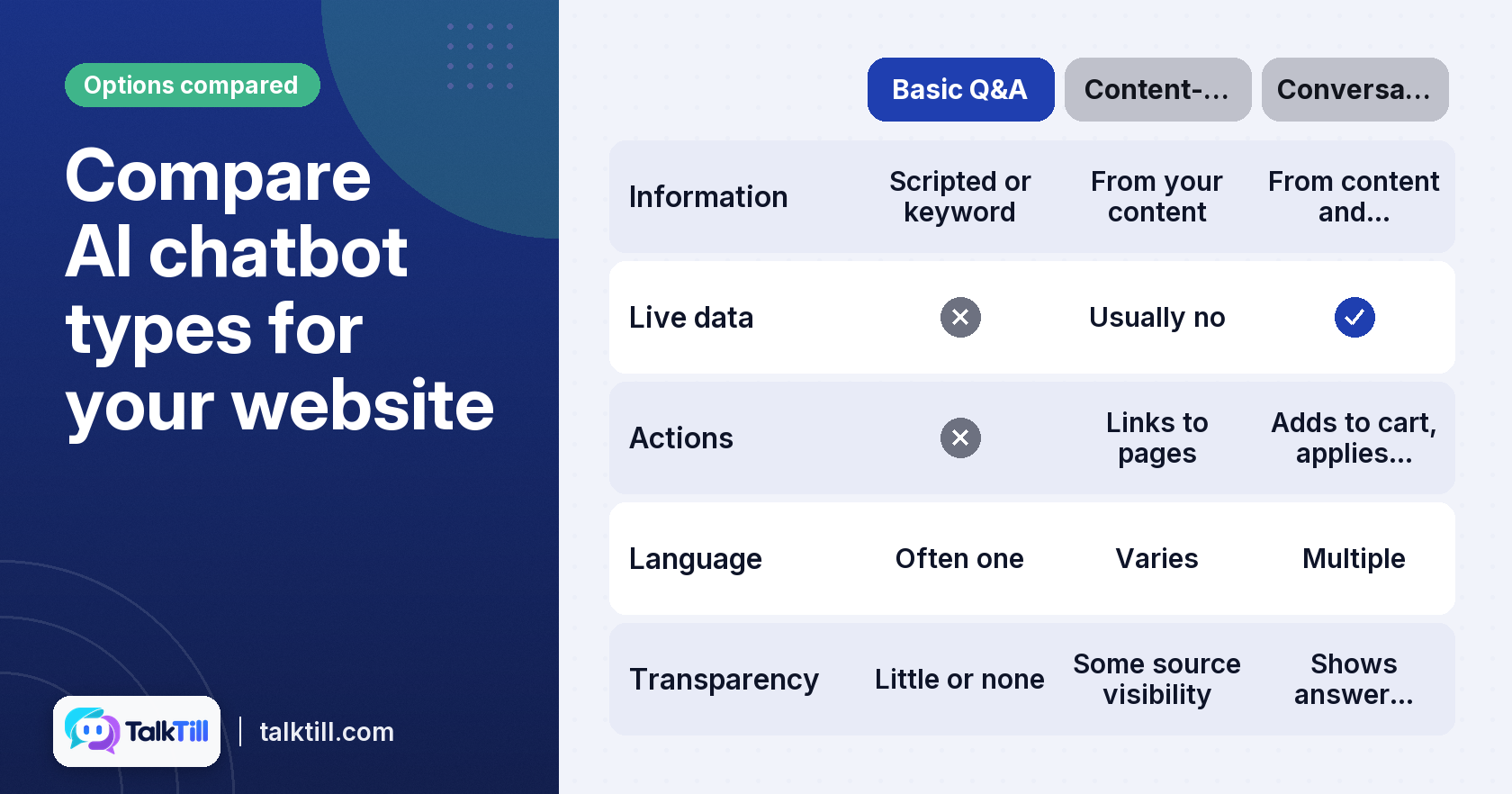
Website chatbots vary a lot in what they can do. The table below sets out three common types and how they compare.
| Function | Basic Q&A Chatbot | Content-Driven Assistant | Conversational Commerce Assistant |
|---|---|---|---|
| Information retrieval | Scripted or keyword matched | Answers from your pages, FAQs and files | Answers from pages, files and the live catalogue |
| Live data integration | None | Usually none | Live price and stock read at the moment of asking |
| Action execution | None | Links to pages | Searches products, adds to cart, applies coupons |
| Language support | Often one language | Varies | Multiple languages, including local scripts |
| Transparency | Little or none | Some source visibility | Shows which passages each answer came from |
A Basic Q&A Chatbot handles common questions with set answers. Setup is usually inexpensive and fast. Scripted bots may not answer questions outside the flows they were configured for.
A Content-Driven Assistant reads your own material and writes answers from it. It handles questions about policies, sizing and delivery well, if the content is clear.
A Conversational Commerce Assistant does both and also works with your store. TalkTill is an example. It reads live stock and prices, speaks English and nine Indian languages, and completes cart actions inside the chat. The shopper gets a finished task, not a link to follow.
What kind of AI chatbot for website suits your business?
The right choice depends on what you need to do. If shoppers mainly ask about policies and hours, a content-driven tool may suffice. If they ask about specific products, stock, and budget fit, you need more.
For basic information retrieval: the Content-Driven Assistant
A Content-Driven Assistant suits businesses with plenty of written material and few products to sell online. It answers from web pages, FAQs and uploaded documents. Set up well, it gives consistent answers without staff time.
Its main limit is that it cannot see live data. If a shopper asks if a jacket is in stock in medium, it can only point to the product page. That is often fine for service businesses and information-heavy sites.
For dynamic sales and support: the Conversational Commerce Assistant
A Conversational Commerce Assistant suits online stores that have live catalogue questions or want in-chat purchase actions. It searches the live catalogue, compares products, shows options and sizes, and adds items to the cart. It can apply coupons and hand the conversation to a person when needed.
Choose this type if your shoppers ask about current stock or price, if you sell across language markets, or if you want the chat to complete a purchase. If none of those apply, a simpler tool is likely enough.
It suits many users. It checks stock and prices so you get current information. It also manages cart actions, supports Indian languages and works well on mobile devices.
Transparency matters in both types. Shoppers should see where an answer came from. TalkTill shows a “Sourced from this store” line under answers built on your own content, and its trace feature lets you check the passages behind each reply.
How to ensure AI chatbot accuracy and transparency?
An accurate chatbot is one whose knowledge sources you understand. Without that, a wrong answer remains a puzzle you cannot solve. The aim is a bot that shows its work.
Understanding how your chatbot finds answers
Most assistants search your content for relevant passages, then write a reply from them. If the right passage is missing, the answer will be wrong. This is why content quality matters.
TalkTill’s trace feature shows the candidate passages for each answer and how they scored against a threshold. You can see which pages carry most answers and which never appear.
Diagnosing and fixing incorrect responses
When an answer is wrong, the trace points to one of three failures. The right passage was never retrieved, which is usually a content or crawl problem. The passage may have been pulled but scored too low. Clearer wording would help. Or the passage was used and still misread, which a verified answer or rule can fix.
Match the fix to the cause. Repair missing or unclear content, adjust a threshold-related passage, or add a verified answer or rule when the model misreads it. For guidance on preparing pages, see Preparing your content for an AI assistant.
Integrating an AI chatbot seamlessly into your online store

A good integration is quick to install, light on page speed and easy to match to your brand. It should work well on phones. Chat can add to page load, which is a performance risk, so check this before you commit.
Lightweight integration for performance
TalkTill’s loader is 7.78 KB, and its chat panel loads only when a shopper opens it, at 37.97 KB. It reserves no space in your page layout. You can install it by pasting a snippet or by using the WooCommerce plugin with your widget ID.
Ask any vendor for its loader size and if the panel loads on demand. Those two numbers show the likely impact on your site.
Customization and user experience
Look for control over design, colours, logo, greeting and position. You can choose from several design styles. On phones, the chat may use most of the screen.
Conversations should persist when a shopper moves between pages or tabs. The AI disclosure should be clear from the start. TalkTill shows “You’re chatting with an AI assistant” in the header, which matches the transparency expected under the EU AI Act.
Choosing the best AI chatbot for your website: a recommendation
Choose a conversational commerce assistant if your store has live catalogue questions or needs in-chat purchase actions such as adding items to a cart or applying coupons. It is the better fit when you sell across language markets and need live stock and price accuracy.
We recommend TalkTill for online stores that need live stock and price details, support for English and nine Indian languages, and cart actions. Its trace feature shows why an answer was given. TalkTill was built by Fourth Dimension in India with local conditions in mind, including patchy connections and mobile use. If you sell mainly information and rarely change your range, a content-driven assistant may work. For the cost side, read AI Chatbot for Business: How to Choose and What to Pay.
Key takeaways
- An AI chatbot for website use ranges from basic Q&A to full conversational commerce.
- Content-driven assistants suit information-heavy sites. Commerce assistants suit stores with live catalogue questions or purchase actions.
- Live stock and price data stop the bot from recommending items that have sold out.
- Transparency, through visible sources and traces, makes wrong answers fixable.
- Check loader size, mobile behaviour and disclosure before choosing.
Conclusion
The best AI chatbot for website use depends on what you need to do. Compare the three types on the functions that matter to you, then test how each one shows its sources. For stores with live catalogue questions or in-chat purchases, a conversational commerce assistant such as TalkTill is worth a close look. You can see how it works on the TalkTill widget page.
FAQs
How to implement an AI chatbot into a website?
Start by choosing a tool, then add its script or plugin to your site, and connect your content and product data. Test common shopper questions before going live. The TalkTill widget can be added by pasting a snippet or through the WooCommerce plugin.
What to not ask an AI?
Avoid asking an AI chatbot for legal, medical or financial advice that needs professional judgement. On a store site, do not rely on it for final prices or stock without live data connected. Check its answers on anything with a real cost to the shopper.
Is chatbot the same as ChatGPT?
Not exactly. A website chatbot is an embedded tool that may use AI models and connect to your content and systems to answer questions about your business.
Is there a free AI chatbot that doesn't have any restrictions?
Free tools usually come with limits on usage, features or data. Unrestricted options are rare for business use. Compare what each free tier allows before you rely on one for customers.
Can an AI chatbot escalate to a human agent?
Yes, many can pass the conversation to a person when a question is too complex. TalkTill includes human handover and a team inbox. Check how handover works before you choose a tool.
How does an AI chatbot read website pages?
It typically crawls your pages, breaks them into passages, and searches those passages when a shopper asks a question. Clear headings and real tables help it find the right text. For setup guidance, see preparing your content for an AI assistant.
Related: Train your chatbot on your catalogue and pages, TalkTill