

Overview
An AI agent is software that handles a customer request from start to finish. It may answer website questions, look up live data, or take simple actions, such as adding items to a cart. We outline four practical steps to set one up: choose your first workflow, pick a platform, connect it to your data, and monitor it over time. The guide also explains the mistakes that often cause setups to struggle.
The guide is written for owners and staff who run a small store or service business and want a reliable, honest assistant rather than a demo.
What are AI agents and how do they benefit small businesses?
An AI agent is a program that can carry out a task rather than only producing a reply. A simple chatbot follows a script of fixed replies. An agent reads the question, looks up the right information, and, when it is connected to suitable tools, may take an action. Some agents can check live data such as stock or prices, but that depends on the specific agent and its integrations. A shopper asking “is the blue one in size 8 still available?” needs an answer from today’s stock, not from a static page, so live access matters for questions like this.
For a small team, the potential benefits are practical. An agent can answer routine questions outside working hours, handle the first questions from a sales lead, and check order status without tying up a staff member. That frees your people for work that needs judgement, such as a complaint about a damaged delivery or a large custom order.
Where agents can help
Common areas for an agent include
- Customer support, where questions about delivery, returns and sizing often repeat.
- Sales assistance where a shopper wants to help choosing a product and then wants to buy it.
- Internal workflows, such as pulling a price list or a stock figure for a team member.
Step 1: Identify repetitive tasks and choose your first workflow
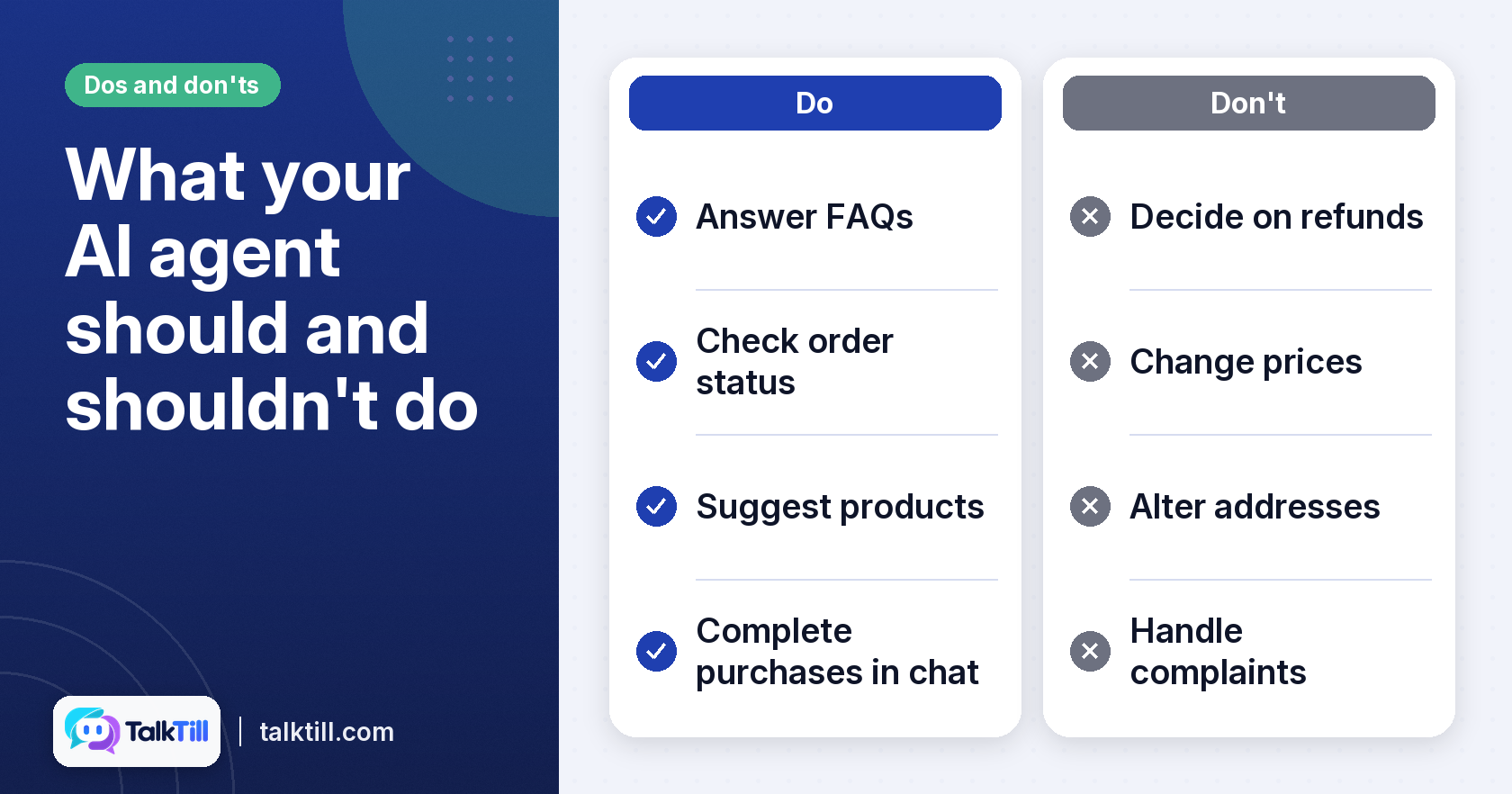
Start by listing the tasks your team handles again and again. Look for work that is predictable and follows clear rules. Answering a question about opening hours is a good candidate. Deciding on a refund after a dispute is not, as it needs human judgement.
Good first tasks include FAQs, basic product information, order status checks, and initial lead qualification. Start with one workflow, not five. A single, well-tested workflow is easier to measure and fix than a broad launch.
Customer support tasks to automate first
Pull your last few hundred support messages and sort them into groups. In many small businesses a handful of questions can account for a large share of the volume, so those are a sensible starting list. Keep the rest for a human until you understand how the agent performs.
Defining action permissions
Before you let an agent act, decide exactly what it can do. Write down each permitted action, such as checking an order status, adding items to a cart, and what it must never do, such as changing prices, issuing refunds, or altering addresses. Limit the agent to the smallest set of actions that serves the workflow. Review this list whenever you add a new integration.
Sales tasks that suit an assistant
A sales assistant can ask a shopper what they need, suggest a few products, and answer questions about size or material. It works best when it can reach your live catalogue. Some sales assistants can also complete the purchase inside the chat, which is worth checking for if you want the conversation to end in a sale rather than a link.
Deciding when a human must take over
Set clear rules for when the agent should stop and pass the conversation to a person. Common triggers include a complaint, a request involving money or personal data, repeated misunderstandings, and any question the agent cannot answer from your content. Write these triggers down before launch, so your team knows what to expect.
Step 2: Choose the right AI agent platform for your needs
Pick a platform that fits the way your business already works. Check how easily it sets up, if it connects to the tools you use, and if it can grow with you.
Integration often decides success. If you run a WooCommerce store, a platform that reads live price and stock from your site answers more questions than one using a monthly copy.
Transparency in how answers are made
Ask how the platform decides what to say. You should be able to see which page or product it used and how confident it was. Some platforms show a receipt for each reply with the source passages and their scores so you can check why an answer was given. Platforms that hide this step leave you guessing when something goes wrong.
Language and mobile performance
If your customers speak more than one language, check that the assistant handles them. TalkTill supports English and nine Indian languages, and its chat stays active when a shopper moves to another tab. Test the experience on a phone before you commit, especially if your shoppers often browse on slower connections.
Pricing you can check
Look for published prices and clear limits. TalkTill publishes its plans and its performance figures, including the ones below its budgets. Judge any vendor by what it will show you in a trial.
Related: An AI sales assistant that fills the cart, TalkTill
Step 3: Train and integrate your AI agent with your business data
Training an agent means giving it accurate material to answer from. Start by pointing it at your store’s homepage URL so it can read your public pages. Then connect the live data sources you need, such as WooCommerce for current prices and stock.
Accuracy depends on the data. An agent given old prices or a discontinued product will repeat them with confidence. Keep your catalogue and FAQs current, and remove pages that no longer apply. Outdated information is a common cause of wrong answers.
Testing before the shopper sees it
Use a test area before you go live. TalkTill’s playground lets you ask shopper questions and see each reply before customers do. Run a realistic list of twenty or thirty questions, including tricky ones, and fix what fails.
What a sales assistant can do in the chat
A well-set-up sales assistant can search the live catalogue, provide product details, handle options such as size, and manage the cart inside the chat. TalkTill’s sales assistant is built to do these things, so a shopper can move from a question to a purchase without leaving the conversation.
Step 4: Monitor performance and refine your AI agent
Launch is the start, not the end. Review the conversations each week and look for answers that were wrong, vague or missing. The most useful question to ask is why an answer went wrong.
A wrong answer usually has one of three causes. The right passage may never have been retrieved, which points to a gap in your content. The passage may have been found but scored too low to use, which suggests it needs to be more specific. Or the passage may have been used and still misread, which is rarer and is fixed with a verified answer or a rule. Telling these apart saves a lot of guesswork.
Using performance data to improve the agent
Use what you learn to improve the content. Rewrite a page so it uses the words shoppers actually use, add a missing product detail, or add a verified answer for a question that keeps coming up. Adjust thresholds only after you understand the cause, not as a first reaction.
Human handover and team inboxes
Some questions need a person. Set up a clear handover, so a shopper can ask for a human and the conversation reaches your team inbox. Check if the handover carries the conversation history with it, so your team can see what has already been said. If it does not, ensure your staff know to ask for the details rather than starting from scratch.
A light, non-disruptive widget
A chat widget should not slow your site. Some loaders are small and their chat panels load only once a shopper opens them. Measure your own site’s speed before and after installation so you can see the effect for yourself.
Common mistakes when implementing AI agents for small business

Many setups run into the same few problems. Avoid these and your odds improve.
- Using incomplete or outdated data. An agent is only as good as what you give it. Keep prices, stock and FAQs current.
- Expecting the agent to solve everything. Plan for a human to handle complaints and unusual requests.
- Ignoring the trace. Without a record of how an answer was made, you cannot tell why it failed or how to fix it.
- Granting too many permissions at once. Start with read-only actions and add others only after testing.
- Choosing a platform that does not scale or integrate. Check your store connection and growth needs before you sign up.
- Setting it up and forgetting it. Review conversations regularly and update the agent as your products change.
Key takeaways
- An AI agent goes beyond fixed replies. Some can look up live information or take simple actions, depending on the tools they are connected to.
- Start with one repetitive, rule-based workflow, such as FAQs, product questions or order status.
- Define exactly which actions the agent may take and when a human must step in.
- Choose a platform that connects to your store, shows how it reached each answer, and supports your customers’ languages.
- Test thoroughly before launch, then review conversations and fix the root cause of each wrong answer.
Conclusion
AI agents for small businesses tend to work best when you start with one clear workflow, use accurate and current data, and keep a person in the loop for the hard cases. Follow the four steps: choose your first workflow, pick a transparent platform, train and test on your data, and monitor and refine over time. Done this way, an agent can become a dependable helper for your customers and your team.
For more on how the TalkTill widget loads and works on a site, see the TalkTill widget page.
FAQs
What is the difference between an AI chatbot and an AI agent?
A basic chatbot follows fixed scripts or answers from a short list of replies. An AI agent reads the question, finds the right information and, when connected to suitable tools, can carry out a simple action such as checking stock or adding an item to a cart.
How much does it cost to implement an AI agent for a small business?
Costs depend on the platform and the volume of conversations you expect. Compare published plans and ask for a trial, because the real cost also includes setup time and the ongoing upkeep of your content.
Can AI agents handle multiple languages?
Many can, but support varies. Check which languages a platform answers in and if it writes them in their own script. TalkTill answers in English and nine Indian languages.
How secure are AI agents with customer data?
Ask the vendor how it stores and protects data, and which information the agent can access. Limit the agent to what it needs, and avoid sharing payment or sensitive personal details through the chat.
What kind of training data do AI agents need?
Give the agent your current product information, pricing, delivery and returns policies, and the questions your customers ask most often. Accuracy matters more than volume, so remove outdated content.
How long does it take to set up an AI agent for a small business?
Setup time varies by platform and by how much content you need to prepare. Some vendors publish their own estimates, so check those and verify them in a trial. Plan for a period of reviewing real conversations before you rely on the agent fully.